Tuesday, November 3, 2015
Nuage Networks and Citrix Collaborate for Application Delivery with SDN and OpenStack
The application landscape is changing. Enterprise organizations are deploying complex scale-out applications.
These applications have many components that have to work together. An application architecture can include a legacy component that resides on a mainframe, it can have services-oriented architecture components, and there can be new micro services that perform specialized tasks.
The network infrastructure is changing in response.
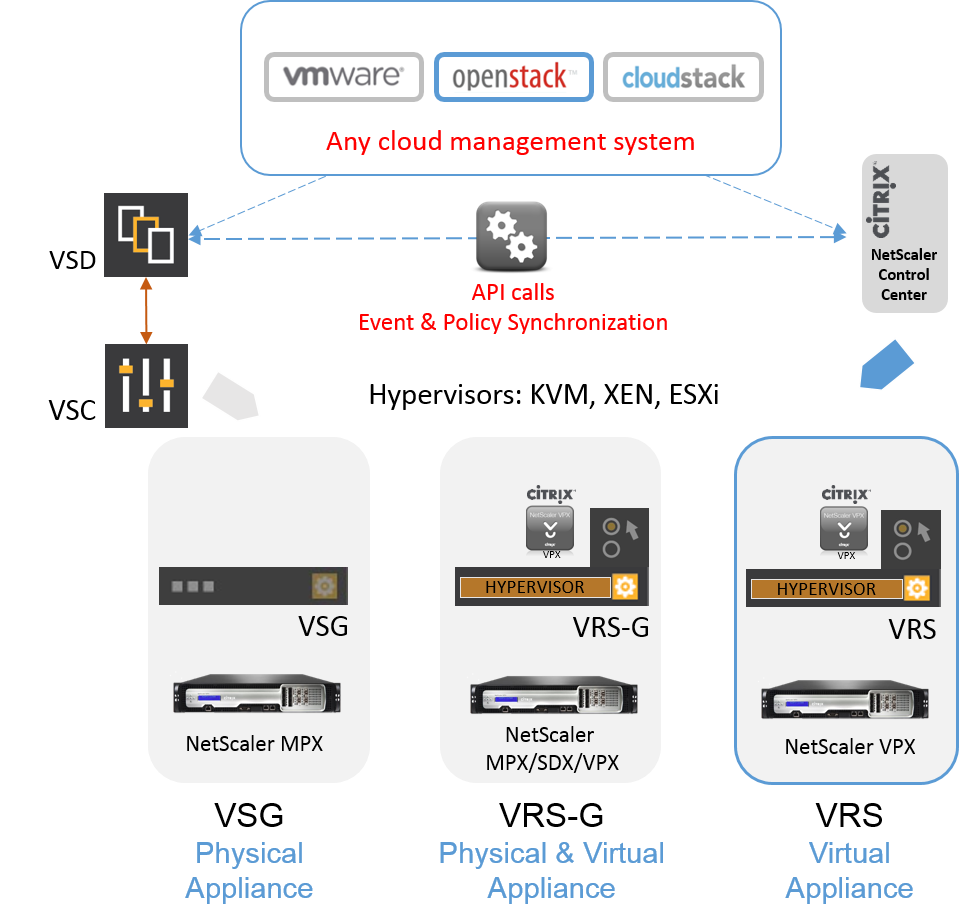
Most applications run on a virtual server infrastructure. Network services are being migrated to virtualized network infrastructure. Network services now exist as virtual appliances. Everything needs to interact, from the application components to the virtual network services.
To connect the components, virtual networks like the Nuage Networks Virtualized Services Platform (VSP) have been developed and organizations are using these to connect the pieces of the virtualized applications and the virtualized network components together.


Monday, November 2, 2015
Red Hat OpenStack & Citrix NetScaler Simplify Deployment of L4-L7 Services
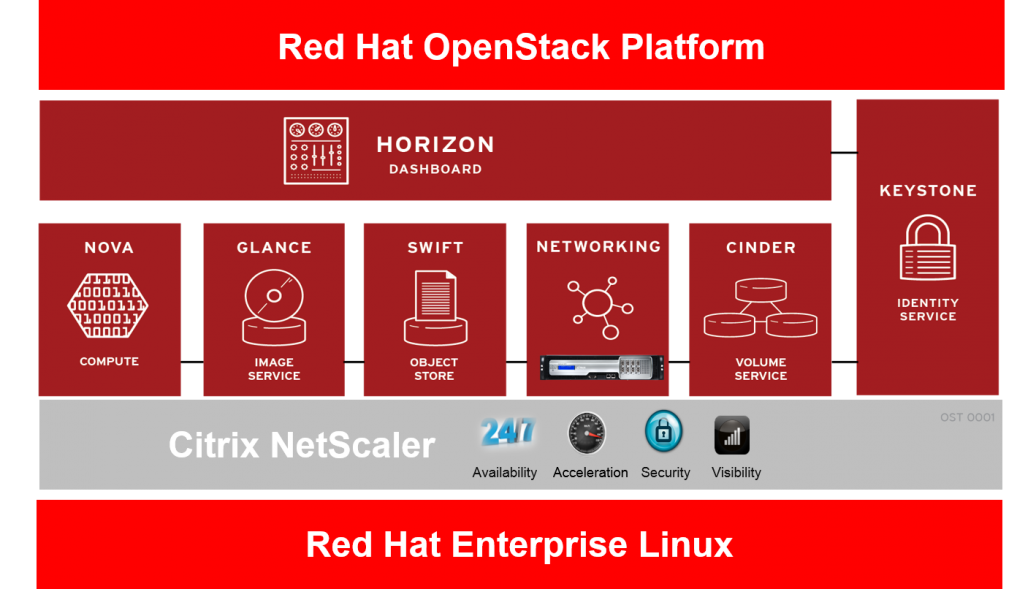
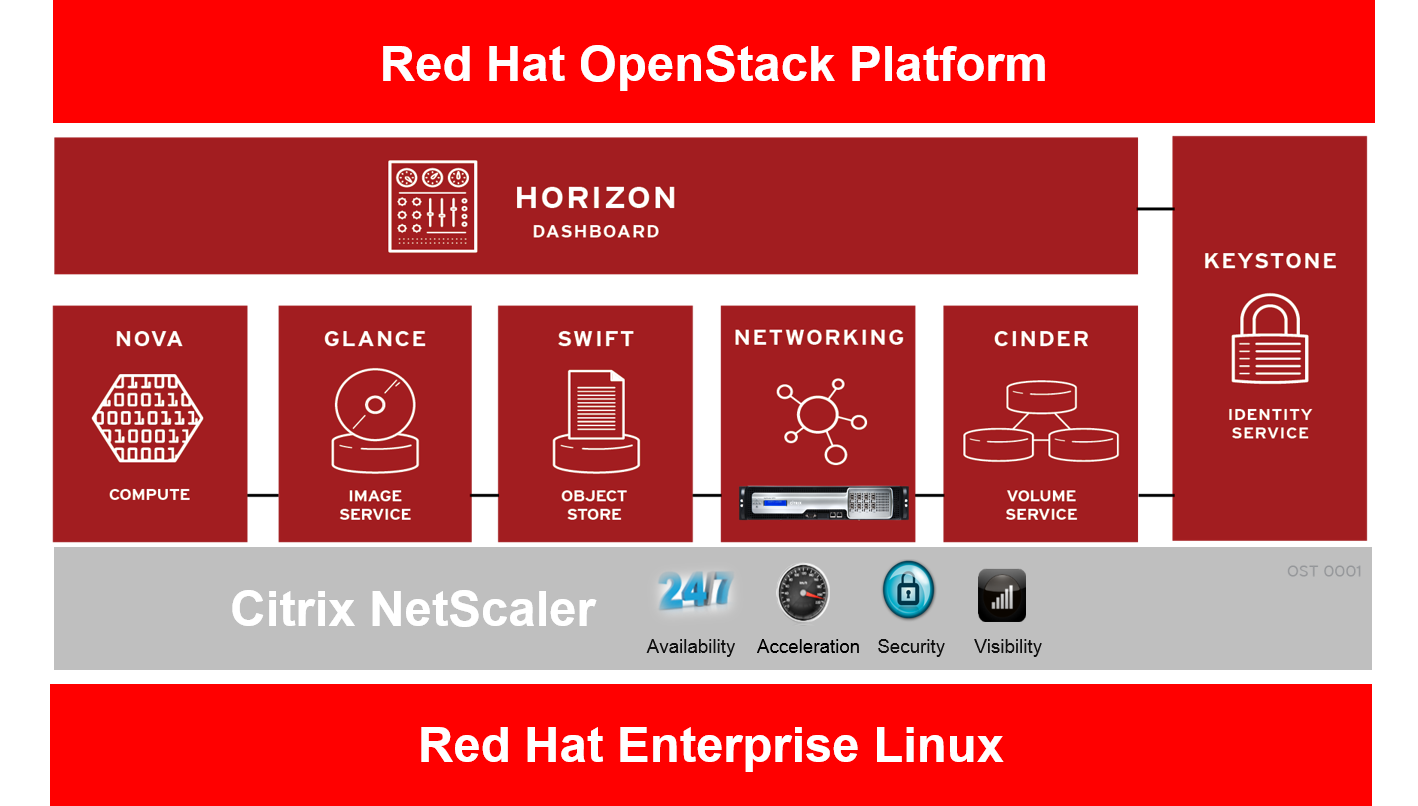
To give customers the ability to automate application delivery network services from OpenStack, Citrix has worked with Red Hat to integrate NetScaler with their OpenStack distribution.
Many organizations are building private cloud platforms as a way to increase the agility of IT infrastructure and to increase the efficiency of operations to support their business critical applications. Over the past few years we have seen an increasing move towards deploying OpenStack, which is an open source cloud management platform, in production environments. By integrating with Red Hat OpenStack, Citrix makes NetScaler available to the many organizations that use this popular OpenStack distribution. As organizations use OpenStack to automate the deployment of servers, storage and networking they are also looking to automate the provisioning of L4 – L7 services. To do this they need their networking equipment vendors to provide integration of their devices with OpenStack in a way that addresses deployment challenges involved in offering infrastructure-as-a-service. These challenges include scalability, elasticity, performance and flexibility/control over resource allocation. Citrix built NetScaler Control Center as a way to ease integration of NetScaler with the LBaaS service in OpenStack. The Citrix LBaaS solution enables IT organizations to guarantee performance and availability service level assurances (SLAs) as well as provide redundancy and seamless elasticity while rapidly deploying line of business applications in OpenSack.
Many organizations are building private cloud platforms as a way to increase the agility of IT infrastructure and to increase the efficiency of operations to support their business critical applications. Over the past few years we have seen an increasing move towards deploying OpenStack, which is an open source cloud management platform, in production environments. By integrating with Red Hat OpenStack, Citrix makes NetScaler available to the many organizations that use this popular OpenStack distribution. As organizations use OpenStack to automate the deployment of servers, storage and networking they are also looking to automate the provisioning of L4 – L7 services. To do this they need their networking equipment vendors to provide integration of their devices with OpenStack in a way that addresses deployment challenges involved in offering infrastructure-as-a-service. These challenges include scalability, elasticity, performance and flexibility/control over resource allocation. Citrix built NetScaler Control Center as a way to ease integration of NetScaler with the LBaaS service in OpenStack. The Citrix LBaaS solution enables IT organizations to guarantee performance and availability service level assurances (SLAs) as well as provide redundancy and seamless elasticity while rapidly deploying line of business applications in OpenSack.
Wednesday, July 8, 2015
Automate Management of NetScaler with Puppet Labs
These days, operations teams are expected to manage increasingly complex infrastructure while meeting business expectations for application delivery.
DevOps practices can be used to enable operations teams to scale servers and applications rapidly and efficiently without time consuming manual configuration. Extending DevOps functionality to the Application Delivery Controller is critical and needs to be a part of any full-featured DevOps software package.

The world is increasingly moving to a model where infrastructure is managed, deployed and scaled as code. NetScaler has been designed to ensure the best APIs and interfaces, fully accessible to the best modern infrastructure management tools out there.
Puppet Labs has been at the forefront of this movement, and we are seeing an increase in our customers that want to integrate and deploy NetScaler as part of their DevOps processes.
This functionality let’s operations teams deploy, automate, and manage the configuration of an entire application infrastructure “stack” including compute, network and storage. This gives application developers the ability to elastically expand and contract infrastructure resources, automate application tests, and reduce application development time frames.
DevOps practices can be used to enable operations teams to scale servers and applications rapidly and efficiently without time consuming manual configuration. Extending DevOps functionality to the Application Delivery Controller is critical and needs to be a part of any full-featured DevOps software package.
The world is increasingly moving to a model where infrastructure is managed, deployed and scaled as code. NetScaler has been designed to ensure the best APIs and interfaces, fully accessible to the best modern infrastructure management tools out there.
Puppet Labs has been at the forefront of this movement, and we are seeing an increase in our customers that want to integrate and deploy NetScaler as part of their DevOps processes.
The Puppet Enterprise Module for NetScaler
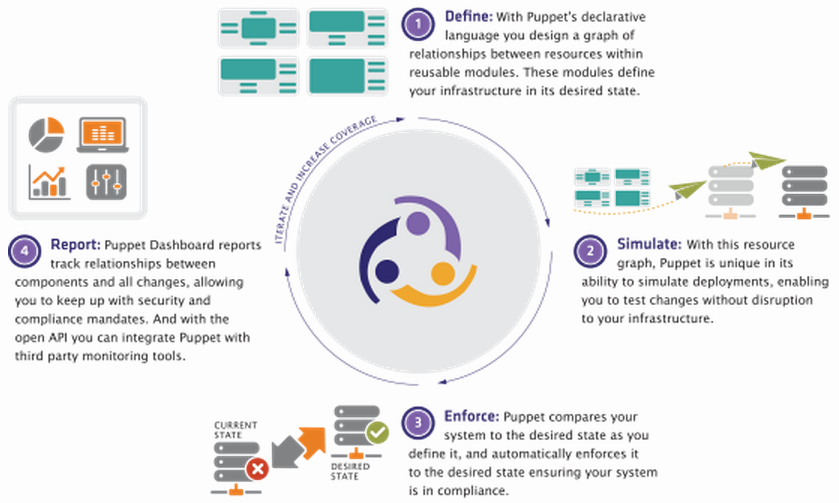
The Citrix NetScaler team and the Puppet Labs module team are happy to announce the availability of the Puppet Enterprise-supported Citrix NetScaler module. This module lets you manage NetScaler physical and virtual appliances. Puppet unifies tooling and processes that used to be siloed, giving you all the benefits of managing your infrastructure as code. With its declarative, model-based approach to IT automation, the Puppet Enterprise solution enables you to perform functions as diverse as automating simple, repetitive tasks to deploying large-scale public, private, and hybrid clouds.
This functionality let’s operations teams deploy, automate, and manage the configuration of an entire application infrastructure “stack” including compute, network and storage. This gives application developers the ability to elastically expand and contract infrastructure resources, automate application tests, and reduce application development time frames.
Wednesday, July 1, 2015
A Practical Path to Automating Application Delivery Networks
The ongoing virtualization of data center infrastructure and integration of cloud computing resources makes it possible to be able to dynamically shift and monitor workloads across those environments.
As data center networks have grown to encompass thousands of devices, existing network architectures have proven inadequate for rapid deployment of applications and unable to keep up with the agility requirements of today’s business environment.
Software Defined Networking (SDN) has been promoted as the solution for dynamically provisioning and automatically configuring network resources as applications are deployed. Recently SDN has moved beyond theory to practical reality, as open standards and growing interoperability among vendors are driving rollouts of new capabilities.
Evolving to an Application Centric Infrastructure
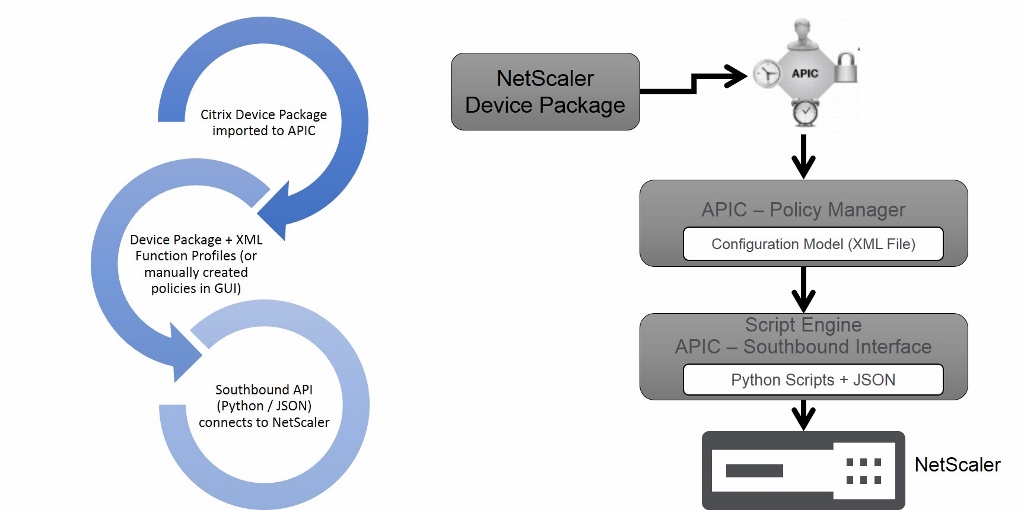
With ACI Cisco envisions a distributed, policy driven approach to SDN that relies on the concept of declarative control. “Declarative control dictates that each object is asked to achieve a desired state and makes a promise to reach this state, without being told precisely how to do so,” according to Cisco. As a result, “underlying objects handle their own configuration state changes and are responsible only for passing exceptions or faults back to the control system. This approach reduces the burden and complexity of the control system and allows greater scale.”
As data center networks have grown to encompass thousands of devices, existing network architectures have proven inadequate for rapid deployment of applications and unable to keep up with the agility requirements of today’s business environment.
Software Defined Networking (SDN) has been promoted as the solution for dynamically provisioning and automatically configuring network resources as applications are deployed. Recently SDN has moved beyond theory to practical reality, as open standards and growing interoperability among vendors are driving rollouts of new capabilities.
Evolving to an Application Centric Infrastructure
With ACI Cisco envisions a distributed, policy driven approach to SDN that relies on the concept of declarative control. “Declarative control dictates that each object is asked to achieve a desired state and makes a promise to reach this state, without being told precisely how to do so,” according to Cisco. As a result, “underlying objects handle their own configuration state changes and are responsible only for passing exceptions or faults back to the control system. This approach reduces the burden and complexity of the control system and allows greater scale.”
Thursday, June 4, 2015
Citrix NetScaler and Cisco ACI: How it all Works
It’s an exciting week ahead at Cisco Live in San Diego.
Citrix is pleased to be a key Cisco ACI ecosystem partner through the integration of the Citrix NetScaler ADC with the Cisco APIC controller.
There are several interesting technologies being leveraged to deliver this joint solution and I thought would be interesting to take a look at how it is implemented. Cisco APIC addresses the two main requirements for achieving the application centric data center vision:
•Policy-based automation framework
•Policy-based service insertion technology
A policy-based automation framework enables the APIC to dynamically provision and configure resources according to application requirements.
As a result, core services such as firewalls and Layer 4 through 7 switches can be consumed by applications and made ready to use in a single automated step.
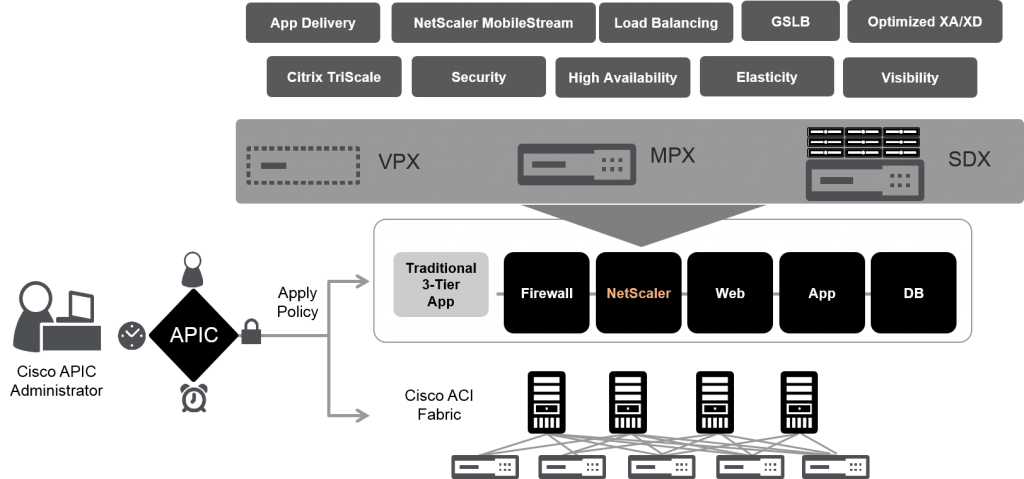
Being application-centric, the APIC allows the creation of application profiles, which define the Layer 4 through 7 services consumed by a given data center tenant application. As a key ADC partner in the ACI ecosystem, Citrix NetScaler provides L4-L7 services such as load balancing, application acceleration, and application security.
Cisco ACI and Citrix NetScaler ADC Solution

Figure 1. Cisco ACI and Citrix NetScaler ADC Solution
Citrix is pleased to be a key Cisco ACI ecosystem partner through the integration of the Citrix NetScaler ADC with the Cisco APIC controller.
There are several interesting technologies being leveraged to deliver this joint solution and I thought would be interesting to take a look at how it is implemented. Cisco APIC addresses the two main requirements for achieving the application centric data center vision:
•Policy-based automation framework
•Policy-based service insertion technology
A policy-based automation framework enables the APIC to dynamically provision and configure resources according to application requirements.
As a result, core services such as firewalls and Layer 4 through 7 switches can be consumed by applications and made ready to use in a single automated step.
Being application-centric, the APIC allows the creation of application profiles, which define the Layer 4 through 7 services consumed by a given data center tenant application. As a key ADC partner in the ACI ecosystem, Citrix NetScaler provides L4-L7 services such as load balancing, application acceleration, and application security.
Cisco ACI and Citrix NetScaler ADC Solution

Figure 1. Cisco ACI and Citrix NetScaler ADC Solution
Tuesday, June 2, 2015
Citrix and Cisco Deliver Application Agility and a Path to Software Defined Networks
Applications are the core of any business. To respond quickly to changing business requirements, IT organizations must be able to deploy applications rapidly across a broad range of physical and virtual infrastructure while ensuring performance, scalability, security and visibility.
But applications are only as agile as the infrastructures on which they run.
With traditional datacenter infrastructure, it can take weeks to make an application change. Cloud, mobility and virtualization trends further complicate the interplay between applications, network services and the underlying infrastructure. Achieving a truly agile, application-driven datacenter requires a flexible infrastructure that can respond dynamically to application needs, automatically provisioning and configuring the necessary resources independent of their location.
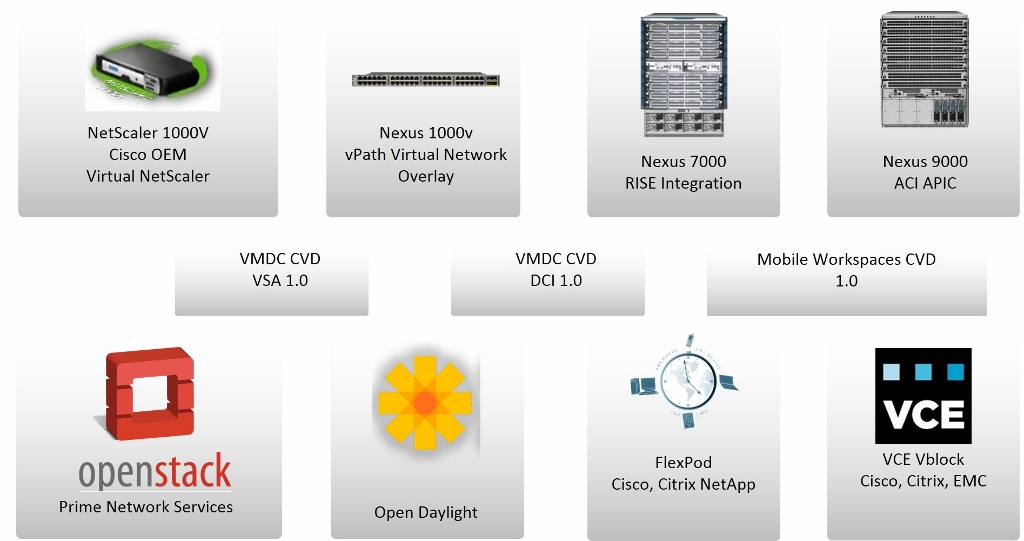
Citrix and Cisco Systems have worked to accelerate the transformation to new network service delivery models that provide greater business agility. They deliver a robust set of capabilities--from product integration and validated designs to new technologies--that provide immediate benefits to customers while streamlining the transition to software-defined networks (SDN) and application-centric infrastructure.
But applications are only as agile as the infrastructures on which they run.
With traditional datacenter infrastructure, it can take weeks to make an application change. Cloud, mobility and virtualization trends further complicate the interplay between applications, network services and the underlying infrastructure. Achieving a truly agile, application-driven datacenter requires a flexible infrastructure that can respond dynamically to application needs, automatically provisioning and configuring the necessary resources independent of their location.
Citrix and Cisco Systems have worked to accelerate the transformation to new network service delivery models that provide greater business agility. They deliver a robust set of capabilities--from product integration and validated designs to new technologies--that provide immediate benefits to customers while streamlining the transition to software-defined networks (SDN) and application-centric infrastructure.
Sunday, May 31, 2015
Cisco ACI and Citrix NetScaler Automate Services Provisioning and Increase Application Performance
With Cisco Live coming up in San Diego at Citrix we are ramping up to talk about NetScaler and the integration that we have done with Cisco Application Centric Architecture (ACI). The world’s leading enterprises, service providers, cloud computing platforms, and eight of the top ten internet-centric companies, have standardized on Citrix NetScaler to deliver their business-critical web applications. By integrating with Cisco ACI we are bringing the benefits of the top application delivery controller to the leading software defined network architecture and enabling our customers to automate NetScaler deployments.
Challenges with Application Delivery
As businesses look to IT as a point of strategic differentiation, agility in the datacenter becomes more critical than ever. Fundamental to this change is the capability of IT to respond quickly to changing business requirements. Applications serve as the core of any business, but applications are only as agile as the infrastructure on which they run. With yesterday’s datacenter infrastructure, this can mean waiting weeks for an application change. Application agility, mobility, and rapid deployment require the datacenter infrastructure to dynamically respond to application needs as a result of changing business requirements.
Challenges with Application Delivery
As businesses look to IT as a point of strategic differentiation, agility in the datacenter becomes more critical than ever. Fundamental to this change is the capability of IT to respond quickly to changing business requirements. Applications serve as the core of any business, but applications are only as agile as the infrastructure on which they run. With yesterday’s datacenter infrastructure, this can mean waiting weeks for an application change. Application agility, mobility, and rapid deployment require the datacenter infrastructure to dynamically respond to application needs as a result of changing business requirements.
Subscribe to:
Posts (Atom)
